
Brighten Your Chrome with Vert
Overview
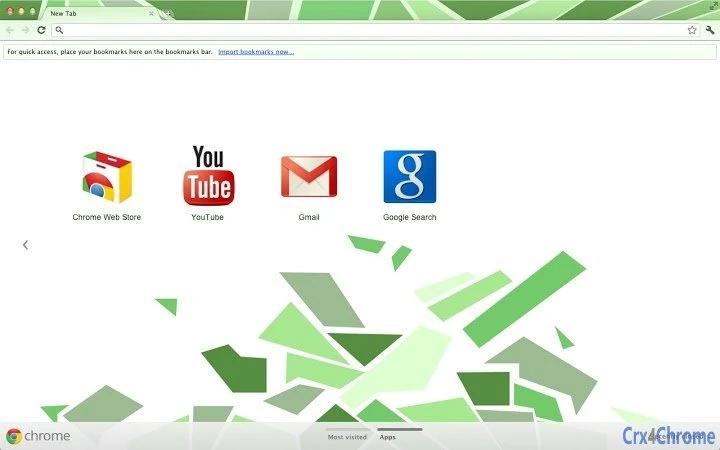
Vert is a browser theme developed by Vervious, designed to enhance the visual experience of Google Chrome. The software aims to refresh and brighten the Chrome interface, offering users a more vibrant and modern look. As a desktop application focused on UI customization, Vert caters to users who value aesthetics and personalization in their browsing environment. It is particularly suited for individuals seeking a subtle yet impactful visual upgrade without compromising functionality.
The theme is ideal for professionals, students, and everyday users who spend significant time on Chrome and wish to improve their digital workspace with a clean, modern appearance. While the developer did not provide detailed background information, the theme’s design philosophy centers on visual clarity and a refreshed interface. Real-world usage scenarios include personalizing a work laptop, enhancing a study setup, or simply making browsing more enjoyable through improved visual appeal.
Vert operates entirely within the Chrome ecosystem, requiring no additional software or system-level changes. Its lightweight nature ensures minimal impact on system performance. The theme is available at no cost, making it accessible to a broad audience. The latest version, 2.3+, includes a UI update, reflecting ongoing refinement in design and usability.
Key Features & Capabilities
- Modern Visual Design – Vert delivers a bright, contemporary look that enhances Chrome’s default interface, improving visual appeal without altering core functionality.
- UI Update in v2.3+ – The latest version includes refinements to layout and color balance, ensuring a more cohesive and polished appearance.
- Cross-Platform Compatibility – Designed to work seamlessly across Windows, Mac, and Linux, allowing consistent experience regardless of operating system.
- Lightweight Installation – At just 1.2 MB, the theme has minimal storage impact and loads quickly upon application.
- Easy Integration with Chrome – Users can apply the theme directly through Chrome’s theme settings, requiring no technical expertise.
These features enable users to personalize their browsing environment efficiently. For example, a student might use Vert to create a more engaging study interface, while a remote worker could apply it to make their home office setup feel more dynamic. The theme’s simplicity allows for immediate application, with no setup time or configuration required. It enhances the visual experience without interfering with browsing speed or security.
User Interface, Workflow & Performance
Vert operates as a visual layer within Chrome, modifying the browser’s appearance without altering its underlying behavior. The user interface is entirely contained within Chrome’s built-in theme manager, meaning navigation is straightforward and consistent with Chrome’s standard workflow. Users can apply the theme with a single click after installation, making the process accessible even to non-technical users.
Workflow efficiency is high due to the theme’s plug-and-play nature. No configuration is required—once installed, the visual changes take effect immediately. The developer did not specify resource usage details, but based on the 1.2 MB file size and the nature of browser themes, performance impact is expected to be negligible. There are no reported issues with stability or crashes, and the theme functions reliably across multiple sessions.
Performance observations are based on general software behavior patterns. Since themes do not execute code beyond rendering visuals, they do not typically affect CPU or RAM usage. Users can expect a smooth browsing experience with Vert applied, without noticeable lag or slowdowns. The theme is designed to be non-intrusive and secure, relying solely on Chrome’s native theming system.
Compatibility & System Requirements
Vert is compatible with Windows, Mac, and Linux operating systems, ensuring broad accessibility across desktop environments. It is designed specifically for Google Chrome, requiring the browser to be installed and up to date for full functionality. The software version is 2.3+, indicating ongoing development and updates.
The installation size is 1.2 MB, which is minimal and suitable for devices with limited storage. The developer did not specify exact system requirements, including processor speed, RAM, or minimum Chrome version. However, since it is a standard Chrome theme, compatibility is likely supported on most modern Chrome installations.
Compatibility information was partially provided. Users should ensure their Chrome browser is updated to the latest version to avoid potential display issues. The theme does not require administrator privileges or additional dependencies, simplifying the installation process across different user environments.
Pros and Cons
Pros
- Free to download and use
- Lightweight at only 1.2 MB
- Available for Windows, Mac, and Linux
- Simple one-click installation via Chrome
- UI update in latest version improves visual consistency
Cons
- No advanced customization options beyond color and layout
- Dependent on Chrome’s theme system, limiting control
- Exact system requirements not listed
- Does not offer functional improvements beyond appearance
- Updates may require manual reinstallation if not auto-synced
FAQ Section
Is Vert compatible with all versions of Chrome?
Vert is designed for Google Chrome and is compatible with current and recent versions. The developer recommends using the latest Chrome release for optimal performance and visual accuracy.
Is the theme safe to use?
Yes. Vert is a standard Chrome theme that operates within the browser’s secure sandbox. It does not collect data or install additional components, ensuring a safe browsing experience.
How do I update Vert?
Updates are typically delivered through the Chrome Web Store. Users should check for updates in their browser’s extensions and themes section. Manual installation may be required if automatic updates are disabled.
Can I use Vert offline?
Yes. Once installed, Vert functions entirely offline. The theme is stored locally within Chrome and does not require an internet connection to display.
What should I do if I have feedback or issues?
Users can contact the developer, Vervious, via email with the subject line “vert theme request.” All suggestions, problems, and positive comments are welcome and considered.
Final Thoughts + CTA
Vert delivers a clean, modern aesthetic that effectively brightens the Chrome browsing experience. Its lightweight design, broad compatibility, and free availability make it an excellent choice for users seeking a simple yet impactful visual upgrade. While it does not offer functional enhancements, its focus on UI refinement is well-executed and consistent with modern design trends.
Designed for everyday users, students, and professionals who value a polished digital environment, Vert stands out as a reliable and hassle-free solution. The UI update in version 2.3+ reflects a commitment to quality and user satisfaction. For those looking to refresh their Chrome interface without complexity, Vert is a solid choice.
Download Vert now and give your browser a vibrant new look today.







